

Simplifying Verizon's Promotion Correction Application
PROJECT TYPE:
Client work for Verizon retail stores.
ROLE:
UX designer | UX strategist | UI designer
TEAM
Verizon Consumer Group
DURATION:
4 weeks
ABOUT THE PROJECT
Project Overview
Retail store representatives at Verizon use the Promotion Correction Application (PCA) to resolve incorrect or missing promotional credits on customer accounts. Representatives manually select new offers from a predefined list- a process that directly impacts billing accuracy, customer trust, and in-store efficiency.
PCA previously operated as a standalone tool outside the primary retail application, creating workflow fragmentation and visual inconsistency. This initiative focused on redesigning the legacy application and integrating it into the core retail platform. The redesigned experience aligned with the existing design system, improving task continuity and supporting faster, more confident decision-making for store representatives.

NEED FOR REDESIGN
The Problem
Unresolved promotional discrepancies lead to higher bills, which often results in store representatives handling frustrated customers who expect immediate resolution. Because these corrections occurred during live interactions, speed and accuracy were critical.
The current PCA experience introduced operational friction at this high-pressure moment.
DISCOVERY WITHIN CONSTRAINTS
Understanding the Existing Workflow
Given the migration timeline, I focused on analyzing the legacy PCA experience to identify friction points before redesigning it within the core retail platform. To ground design decisions, the following activities were done:
-
Reviewed the existing PCA interface and interaction patterns.
-
Attended knowledge transfer sessions with the PCA lead to understand system logic and business constraints.
-
Observed recorded sessions of store representatives navigating the tool.
User Persona
Store representative: Mike Mayor, 20 years
Mike works in a fast-paced retail environment at the store in FlowerMound (TX), assisting customers with service changes, purchases, and billing issues. He just graduated from college and has been working at Verizon for the past 8 months.

Goals:
-
Resolve customer issues quickly during live interactions
-
Ensure billing accuracy to maintain customer trust
-
Minimize time spent navigating complex internal tools
Behavior:
-
Skims and scans information under time pressure
-
Switches between systems to complete tasks
-
Relies on memory when workflows don’t support clear mapping
-
Performs bulk corrections during high-volume scenarios
Painpoints:
-
Time-consuming manual validation of promotional offers
-
Difficulty mapping trade-in devices to the correct MDNs
-
Excessive scrolling and dense information on small screens
-
Disrupted flow due to system switching
User Journey
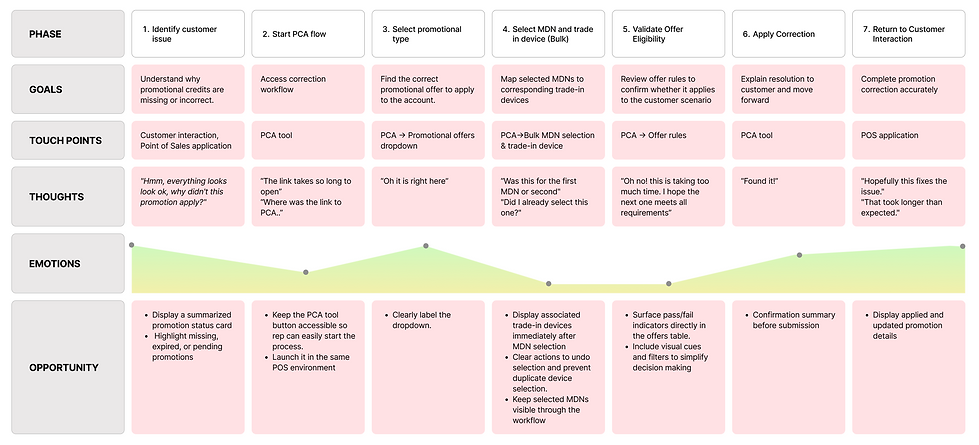
I mapped the current-state journey to understand how store representatives navigated promotional corrections and where friction occurred. This exercise highlighted key opportunities to improve task continuity, decision speed, and information clarity throughout the workflow.
Insights
01
Absence of Pre-Attentive Cues Increased Manual Validation
The offers table presented all entries with equal visual weight, providing no prioritization or eligibility cues.
User Behavior
Representatives were required to click through all offers to determine whether the rules qualified, didn’t qualify, or had a hard stop.
Resulting Action
It’s a repetitive cycle till they find an offer with rules that qualify eligibility.
02
Bulk Selection Workflow Relied on Recall Over Recognition
When handling bulk corrections, representatives were required to match selected phone numbers to their corresponding trade-in devices based on numeric order in the table.
User Behavior
Because the association was not visually reinforced, users relied on memory and scrolling to complete the mapping accurately.
Resulting Action
This increased the risk of misalignment and introduced additional mental effort during multi-step corrections.
03
Persistent Data Visibility Increased Cognitive Load
The MDN (account-associated phone numbers) table continuously displayed promotional case details for all account-associated numbers, regardless of task relevance.
User Behavior
On the 8.3” iPad Mini used in-store, this resulted in excessive scrolling and visual clutter.
Resulting Action
This forced representatives to parse non-essential information while attempting to complete targeted corrections.
Collectively, these insights revealed that the primary issue was not system complexity, but how the complexity was presented. Since business rules could not be simplified, the opportunity lay in improving content display to support faster recognition and more confident decision-making.
THE SOLUTION
Elevated PCA Experience
Introduced Eligibility Cues to Support Faster Recognition
To address technical constraints preventing auto-validation of rules, I introduced visual indicators within each offer to highlight the rule eligibility statuses at a glance.
This allows representatives to quickly assess whether they should address the soft stops or find the next most eligible offer, improving decision-making speed without altering backend logic.


Reduced Recall Burden in Bulk Trade-In Mapping
To reduce recall-based errors, I restructured the flow so that trade-in device selection surfaced immediately after a phone line was selected. Once saved, the associated device was disabled from further selection, preventing duplication and reinforcing mapping accuracy.
This shift supported recognition over recall and reduced error risk in multi-step corrections.
Structured Dense Information Using Section-Based Hierarchy
As there was no way for the system to predict the number of selections a representative would make in the case of bulk selections, progressive disclosure patterns were not feasible within the system’s data structure.
To maintain consistency, I introduced clear sectional grouping and visual hierarchy to organize persistent information, allowing representatives to scan and locate relevant data more efficiently without removing required system details.
.png)
Continue Exploring More Projects
Academic project
UI design | UX design | Product design
Live project
Visual design | UX strategy and design
Academic project
UI design | UX strategy and design